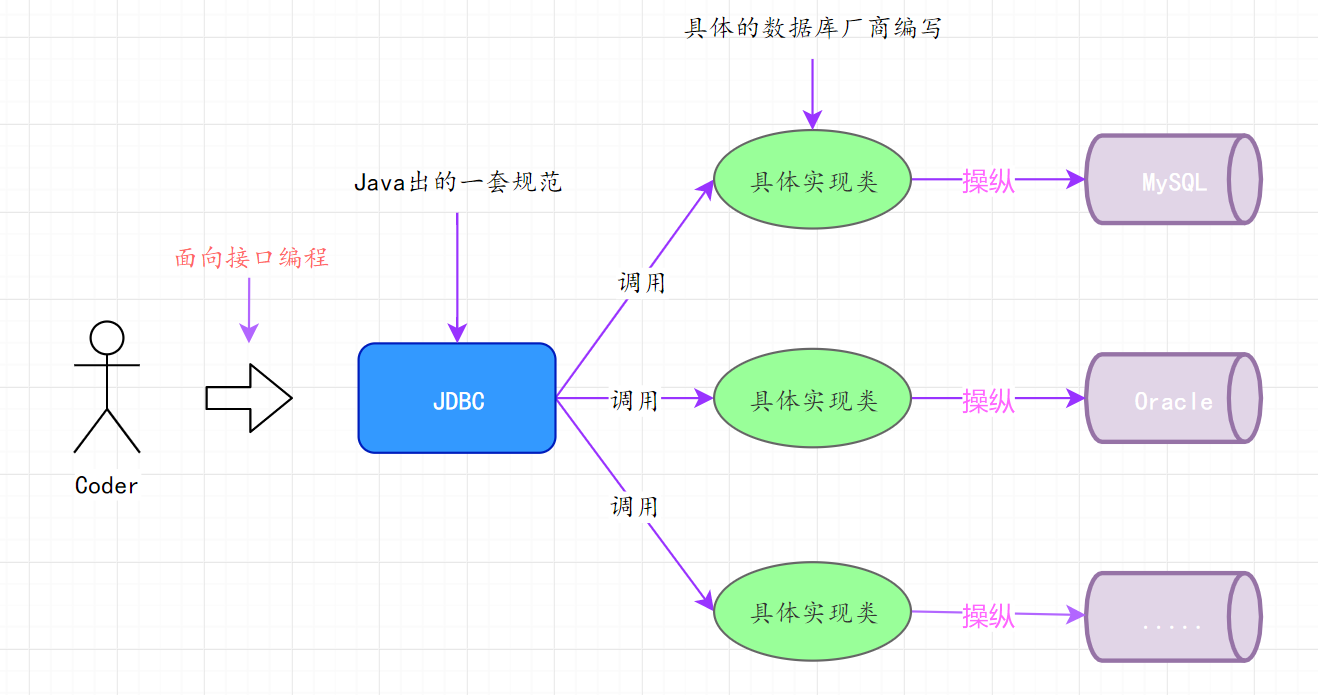
JDBC、预编译、连接池 一、JDBC入门 1.1 什么是JDBC Java Database Connectivity,简称JDBC;是Java语言中用来规范客户端程序如何来访问数据库的应用程序接口 ,提供了诸如查询和更新数据库中数据的方法。JDBC也是Sun Microsystems的商标。我们通常说的JDBC是面向关系型数据库的。
1.2 使用JDBC的好处:
JDBC API是一组接口,没有具体的实现。实现类由各数据库厂商去实现。我们只需要调用接口中的方法即可。
我们的JDBC代码只需要少量的修改就可以访问另一种数据库。
以后我们学习的所有数据库框架,底层最终都会转成JDBC的代码来实现。
1.3 JDBC开发使用到的包:
会使用到的包
说明
java.sql
今天要学习的包,所有的接口和类都在这个包中
javax.sql
数据库访问的高级内容,如:连接池
数据库的驱动
如:mysql的驱动 com.mysql.jdbc.Driver
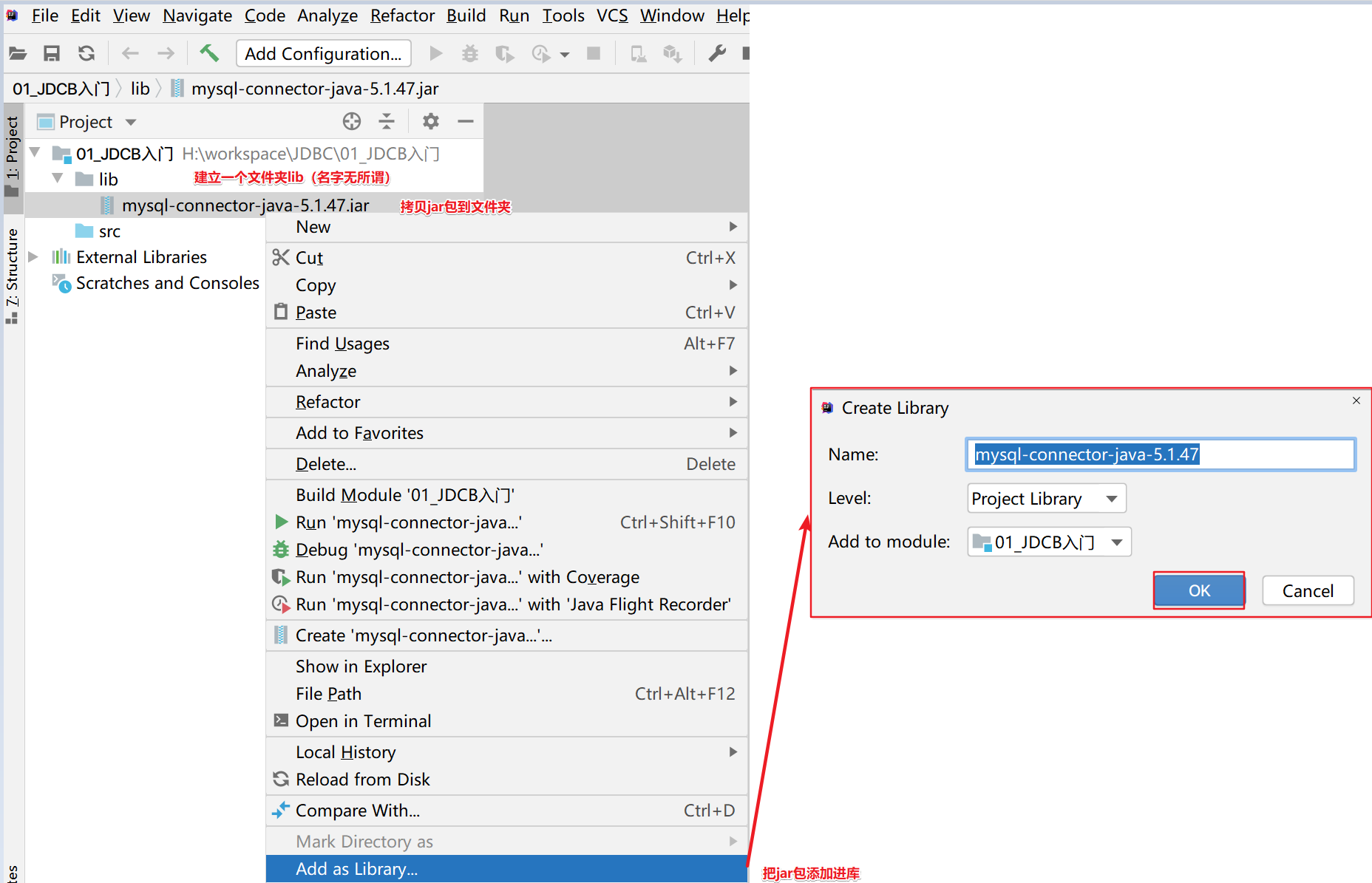
1.4 导入驱动Jar包
1.5 JDBC的核心API
接口或类
作用
DriverManager类
1. 加载和注册第三方厂商的驱动程序 2. 创建一个数据库的连接对象
Connection接口
代表一个创建好的连接对象
Statement接口
代表一条要发送给服务器的SQL语句对象
PreparedStatement接口
代表一条要发送给服务器的SQL语句对象,是Statement接口的子接口
ResultSet接口
代表从服务器上返回的查询结果集
1.6 类中的方法:
DriverManager类中的静态方法
描述
Connection getConnection (String url, String user, String password)
得到一个连接对象 url: 连接字符串 user: 用户名 password: 密码
Connection getConnection (String url, Properties info)
得到一个连接对象 url: 连接字符串 info: 属性集合对象,封装了所有的数据库连接参数
1.7 使用JDBC连接数据库的四个参数:
JDBC连接数据库的四个参数
说明
用户名
root
密码
root
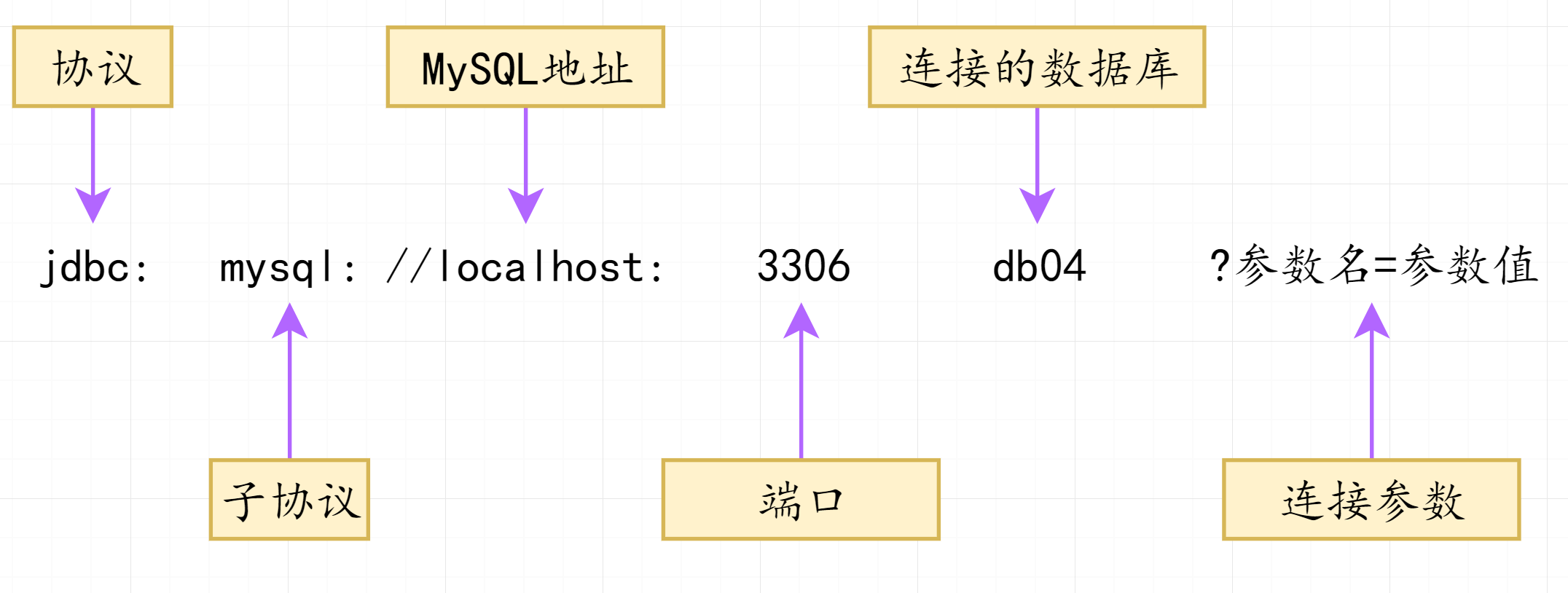
URL连接字符串
指定客户端与服务器连接的参数
驱动名
com.mysql.jdbc.Driver
MySQL中简写:jdbc:mysql:///test(服务器必须是localhost,端口号必须是3306)
1.7.1 乱码的处理 如果数据库出现乱码,可以指定参数:?characterEncoding=utf8,表示让数据库以UTF-8编码来处理数据。
1 jdbc :mysql://localhost:3306/test?characterEncoding=utf8&serverTimezone=GMT%2b8
1.8 案例:得到MySQL的数据库连接对象 1 2 3 4 5 6 7 8 9 10 11 12 13 14 15 16 17 18 19 20 21 22 23 24 25 26 27 public class Demo01 { public static void main (String[] args) throws SQLException { Connection c1 = DriverManager.getConnection("jdbc:mysql://localhost:3306/db04" , "root" , "admin" ); System.out.println(c1); Properties info = new Properties (); info.setProperty("user" ,"root" ); info.setProperty("password" ,"admin" ); Connection c2 = DriverManager.getConnection("jdbc:mysql:///db04" , info); System.out.println(c2); } }
二、Connection接口: Connection:代表一个客户端与服务器端之间创建的一个连接对象,通过连接对象可以创建SQL语句对象Statement和PreparedStatement对象
2.1 Connection方法:
Connection接口中的方法
描述
Statement createStatement()
通过连接对象创建SQL语句对象
1 2 3 4 5 6 7 8 9 10 11 12 13 14 15 16 public class Demo02 { public static void main (String[] args) throws ClassNotFoundException, SQLException { Connection conn = DriverManager.getConnection("jdbc:mysql://localhost:3306/db04" ,"root" ,"admin" ); Statement stmt = conn.createStatement(); System.out.println("语句对象:" + stmt); } }
三、Statement接口 Statement:代表一个SQL语句对象,需要将它发送给服务器去执行。
3.1 Statement中的方法:
Statement接口中的方法
描述
boolean execute(String sql)
作用:可以执行任何的SQL语句 返回值:如果SQL语句执行后有结果集,返回true,如果没有,返回false
int executeUpdate(String sql)
作用:用于执行DML语句,增删改:insert, update, delete 返回值:影响的行数
ResultSet executeQuery(String sql)
作用:用于DQL语句,查询select 返回值:查询到的结果集
3.2 释放资源
释放的对象:结果集ResultSet,语句对象Statement,连接对象Connection
释放顺序:先开的后关,后开先关。ResultSet -> Statement -> Connection对象
放在哪里: finally,无论有没有异常,都必须关闭。
放在try()中的类必须实现AutoClosable接口,才可以自动关闭。
1 2 3 4 5 6 public interface Connection extends Wrapper , AutoCloseablepublic interface Statement extends Wrapper , AutoCloseablepublic interface ResultSet extends Wrapper , AutoCloseable
3.3 执行DDL操作
需求:使用JDBC在MySQL的数据库中创建一张学生表
id是主键,整数类型,自增长
name是varchar(20),非空
性别是boolean类型,在mysql中使用的tinyint微整型(0假 1真)
生日是date类型
1 2 3 4 5 6 7 CREATE TABLE student ( id int PRIMARY KEY auto_increment, name VARCHAR (20 ) not null , gender char (1 ), birthday date , address varchar (30 ) );
1 2 3 4 5 6 7 8 9 10 11 12 13 14 15 16 17 18 19 20 21 22 23 24 25 26 27 28 29 30 31 32 33 34 35 36 37 38 39 40 41 42 43 44 45 46 47 48 49 50 51 52 53 54 55 56 57 58 59 60 61 package com.dfbz.demo;import org.junit.Test;import java.sql.Connection;import java.sql.DriverManager;import java.sql.SQLException;import java.sql.Statement;public class Demo3 { @Test public void test1 () { Connection conn = null ; Statement stmt = null ; try { conn = DriverManager.getConnection("jdbc:mysql://localhost:3306/db04" , "root" , "admin" ); stmt = conn.createStatement(); String sql = "CREATE TABLE student (\n" + " id int PRIMARY KEY auto_increment,\n" + " name VARCHAR(20) not null,\n" + " gender char(1),\n" + " birthday date,\n" + " address varchar(30)\n" + ");" ; boolean b = stmt.execute(sql); System.out.println(b); } catch (SQLException e) { e.printStackTrace(); } finally { if (stmt != null ) { try { stmt.close(); } catch (SQLException e) { e.printStackTrace(); } } if (conn != null ) { try { conn.close(); } catch (SQLException e) { e.printStackTrace(); } } } } }
1 2 3 4 5 6 7 8 9 10 11 12 13 14 15 16 17 18 19 20 21 22 23 24 25 26 27 28 29 30 31 @Test public void test2 () { try ( Connection conn = DriverManager.getConnection("jdbc:mysql://localhost:3306/db04" , "root" , "admin" ); Statement stmt = conn.createStatement(); ) { String sql = "CREATE TABLE student (\n" + " id int PRIMARY KEY auto_increment,\n" + " name VARCHAR(20) not null,\n" + " gender char(1),\n" + " birthday date,\n" + " address varchar(30)\n" + ");" ; boolean b = stmt.execute(sql); System.out.println(b); } catch (SQLException e) { e.printStackTrace(); } }
3.4 执行DML操作
1 2 3 4 5 6 7 8 9 10 11 12 13 14 15 16 17 18 19 20 21 22 23 24 25 26 27 @Test public void test3 () { try ( Connection conn = DriverManager.getConnection("jdbc:mysql:///db04" , "root" , "admin" ); Statement stmt = conn.createStatement(); ) { String sql="insert into student values\n" + "(null,'小明','男','2000-10-20','湖南永州'),\n" + "(null,'小红','女','1998-08-24','福建南平'),\n" + "(null,'小军','男','1997-06-18','四川泸州'),\n" + "(null,'小聪','男','2001-10-21','贵州遵义');" ; int row = stmt.executeUpdate(sql); System.out.println("影响的行数:" + row); } catch (SQLException e) { e.printStackTrace(); } }
1 2 3 4 5 6 7 8 9 10 11 12 13 14 15 16 17 18 19 @Test public void test4 () throws SQLException { Connection conn = DriverManager.getConnection("jdbc:mysql://localhost:3306/db04" , "root" , "admin" ); Statement stmt = conn.createStatement(); String sql = "update student set name='明明', gender='女', birthday='1999-05-14', address='山东菏泽' where id=1" ; int row = stmt.executeUpdate(sql); System.out.println("影响的行数: " + row); stmt.close(); conn.close(); }
1 2 3 4 5 6 7 8 9 10 11 12 13 14 15 16 17 18 19 @Test public void test5 () throws SQLException { Connection conn = DriverManager.getConnection("jdbc:mysql://localhost:3306/db04" , "root" , "admin" ); Statement stmt = conn.createStatement(); String sql = "delete from student where id=2" ; int row = stmt.executeUpdate(sql); System.out.println("影响的行数: " + row); stmt.close(); conn.close(); }
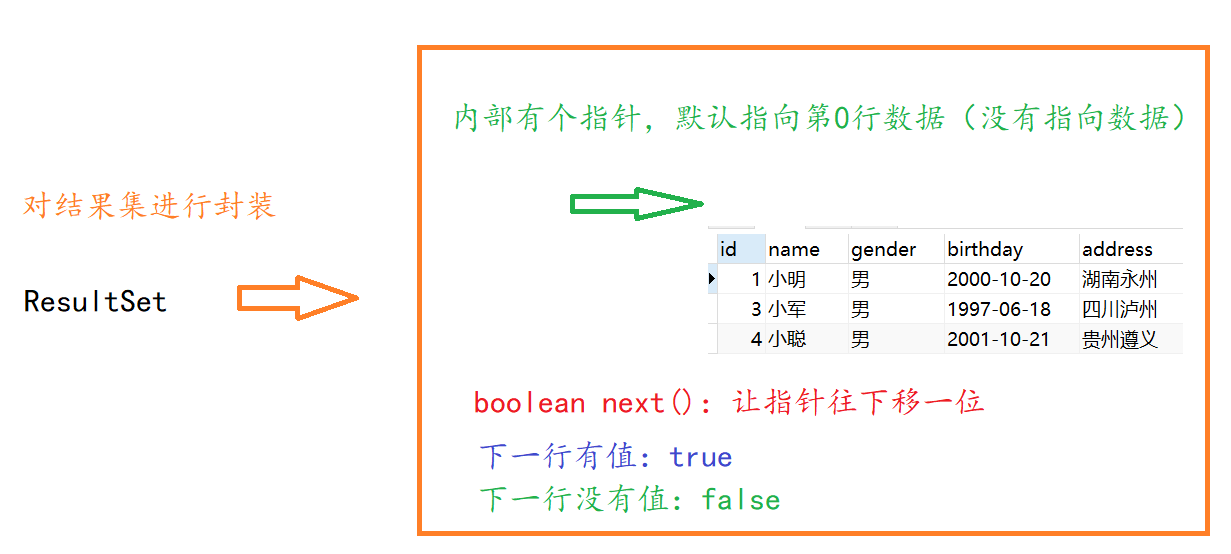
3.5 执行DQL操作 3.5.1 ResultSet接口: 作用:封装从数据库服务器中查询到的所有记录。从结果集对象中得到查询的数据
原理:
接口中的方法:
ResultSet接口中的方法
描述
boolean next()
1) 向下移动一行
数据类型 getXxx(参数)
得到每一列的数据
3.5.2 常用数据类型转换表
SQL类型
Jdbc对应方法
返回类型
BIT(1) bit(n)
getBoolean() boolean
TINYINT
getByte() byte
SMALLINT
getShort() short
INT
getInt() int
BIGINT
getLong() long
CHAR,VARCHAR
getString() String
DATE
getDate() java.sql.Date 只表示日期
TIME
getTime() java.sql.Time 只表示时间
TIMESTAMP,DateTime
getTimestamp() java.sql.Timestamp 同时有日期和时间
3.5.3 日期和时间相关的三个方法说明
日期:java.sql.Date
时间:java.sql.Time
时间戳:java.sql.Timestamp
共同父类:java.util.Date
需求:确保数据库中有3条以上的记录,查询所有的学员信息
1 2 3 4 5 6 7 8 9 10 11 12 13 14 15 16 17 18 19 20 21 22 23 24 25 26 27 28 29 30 31 32 33 34 35 36 37 38 39 40 41 42 43 44 45 46 47 48 49 50 51 52 53 54 55 56 57 58 package com.dfbz.demo;import org.junit.Test;import java.sql.*;public class Demo04_DQL { @Test public void test1 () throws Exception { Connection conn = DriverManager.getConnection("jdbc:mysql:///db04" , "root" , "admin" ); Statement statement = conn.createStatement(); ResultSet rs = statement.executeQuery("select * from student" ); while (rs.next()) { int id = rs.getInt(1 ); String name = rs.getString(2 ); String gender = rs.getString(3 ); Date birthday = rs.getDate(4 ); String address = rs.getString(5 ); System.out.println("id: " + id); System.out.println("name: " + name); System.out.println("gender: " + gender); System.out.println("birthday: " + birthday); System.out.println("address: " + address); System.out.println("-----------------------------" ); } rs.close(); statement.close(); conn.close(); } }
3.6 关于ResultSet接口中的注意事项:
如果光标在第一行之前,使用rs.getXX()获取列值,报错:Before start of resultset
如果光标在最后一行之后,使用rs.getXX()获取列值,报错:After end of resultset
四、数据库工具类JdbcUtils 如果某些代码可重用性很强,没有什么变化。可以将它们抽取出来写成一个工具类调用。
4.1 创建工具类
把几个字符串定义成常量:用户名,密码,URL,驱动类
注册驱动,为了兼容以前的程序
得到数据库的连接:getConnection()
关闭所有打开的资源:
1
2
3
4
5
6
7
8
9
10
11
12
13
14
15
16
17
18
19
20
21
22
23
24
25
26
27
28
29
30
31
32
33
34
35
36
37
38
39
40
41
42
43
44
45
46
47
48
49
50
51
52
53
54
55
56
57
58
59
60
61
package com.dfbz.utils;import java.sql.*;public class JdbcUtils { private static final String USER = "root" ; private static final String PASSWORD = "admin" ; private static final String URL = "jdbc:mysql:///db04" ; private static final String DRIVER = "com.mysql.jdbc.Driver" ; public static Connection getConnection () throws SQLException { return DriverManager.getConnection(URL, USER, PASSWORD); } public static void close (Connection conn, Statement stmt, ResultSet rs) { if (rs!=null ) { try { rs.close(); } catch (SQLException e) { e.printStackTrace(); } } if (stmt!=null ) { try { stmt.close(); } catch (SQLException e) { e.printStackTrace(); } } if (conn!=null ) { try { conn.close(); } catch (SQLException e) { e.printStackTrace(); } } } public static void close (Connection conn, Statement stmt) { close(conn, stmt, null ); } }
4.2 案例:用户登陆 需求:有一张用户表,添加几条用户记录
1 2 3 4 5 6 7 8 9 10 11 12 13 14 15 create table `user `(id int primary key auto_increment, `name` varchar (20 ), `password` varchar (20 ) ); insert into user values (null , 'admin' ,'123' ),(null ,'root' ,'456' );select * from user ;select * from user where name= 'admin' and password= '123' select * from user where name= 'root' and password= '999'
使用Statement字符串拼接的方式实现用户的登录,用户在控制台上输入用户名和密码。
4.2.1 开发步骤:
得到用户从控制台上输入的用户名和密码
调用下面写的登录方法来实现登录
写一个登录的方法
通过工具类得到连接
创建语句对象,使用拼接字符串的方式生成SQL语句
查询数据库,如果有记录则表示登录成功,否则登录失败
释放资源
4.2.2 代码: 1 2 3 4 5 6 7 8 9 10 11 12 13 14 15 16 17 18 19 20 21 22 23 24 25 26 27 28 29 30 31 32 33 34 35 36 37 38 39 40 41 42 43 44 45 46 package com.dfbz.demo;import com.dfbz.utils.JdbcUtils;import java.sql.Connection;import java.sql.ResultSet;import java.sql.Statement;import java.util.Scanner;public class Demo05_Login { public static void main (String[] args) throws Exception{ Scanner scanner = new Scanner (System.in); System.out.println("请输入用户名:" ); String name = scanner.nextLine(); System.out.println("请输入密码:" ); String password = scanner.nextLine(); Connection conn = JdbcUtils.getConnection(); Statement stmt = conn.createStatement(); String sql = "select * from user where name='" + name + "' and password='" + password + "'" ; ResultSet rs = stmt.executeQuery(sql); if (rs.next()) { System.out.println("登录成功," + name); } else { System.out.println("登录失败" ); } JdbcUtils.close(conn, stmt, rs); } }
五、SQL注入问题
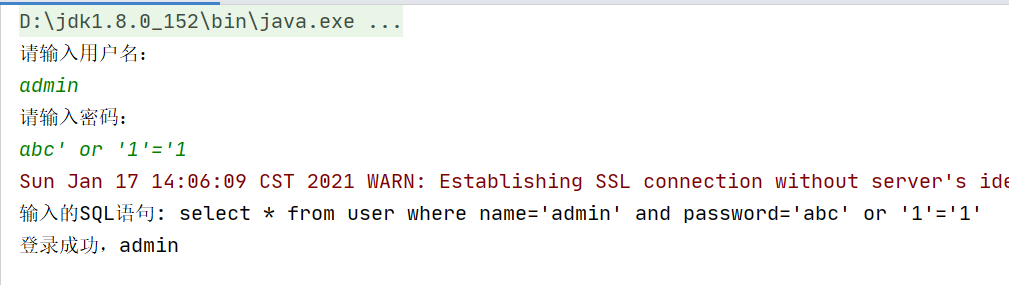
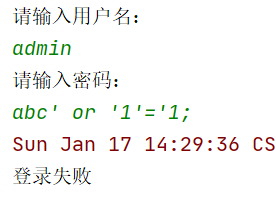
当我们输入以下密码,我们发现我们账号和密码都不对竟然登录成功了
1 2 3 4 5 6 7 8 select * from user where name= 'admin' and password= 'abc' or '1' = '1' ;select * from user where false and false or true ;select * from user where false or true ;select * from user where true ;
我们让用户输入的密码和SQL语句进行字符串拼接。用户输入的内容作为了SQL语句语法的一部分,改变了原有SQL真正的意义,以上问题称为SQL注入。要解决SQL注入就不能让用户输入的密码和我们的SQL语句进行简单的字符串拼接。
5.1 PreparedStatement概述
如何解决SQL注入的问题,必须使用Statement它的子接口
5.2 PreparedStatement中相关的方法 5.2.1 PreparedStatement接口中的方法:
PreparedStatement接口中的方法
描述
int executeUpdate()
执行DML,增删改的操作。注:没有参数。 SQL语句在创建PreparedStatement对象的时候就已经提供了,所以执行的时候没有SQL语句 返回:影响的行数
ResultSet executeQuery()
执行DQL,查询操作 返回:结果集
5.2.2 使用PreparedStatement 5.2.2.1 开发步骤:
编写SQL语句,未知内容使用占位符
获得PreparedStatement对象
设置实际参数,使用set数据类型(占位符位置, 真实值)
执行参数化SQL语句
关闭资源
5.2.2.2 相应的方法
PreparedStatement的方法
说明
void setXxx(int 参数1,参数2) Xxx数据类型
替换SQL语句中的占位符 参数1: 占位符的位置,第几个位置,从1开始 参数2: 用来替换占位符的真实的值
PreparedStatement中设置参数的方法
描述
void setDouble(int parameterIndex, double x)
将指定参数设置为给定 Java double 值。
void setFloat(int parameterIndex, float x)
将指定参数设置为给定 Java REAL 值。
void setInt(int parameterIndex, int x)
将指定参数设置为给定 Java int 值。
void setLong(int parameterIndex, long x)
将指定参数设置为给定 Java long 值。
void setObject(int parameterIndex, Object x)
使用给定对象设置指定参数的值。
void setString(int parameterIndex, String x)
将指定参数设置为给定 Java String 值。
案例:使用PreparedStatement改写登录程序
1 2 3 4 5 6 7 8 9 10 11 12 13 14 15 16 17 18 19 20 21 22 23 24 25 26 27 28 29 30 31 32 33 34 35 36 37 38 39 40 41 42 43 44 45 46 47 48 49 50 51 52 53 54 55 56 57 58 59 60 61 package com.dfbz.utils;import java.sql.*;public class JdbcUtils { private static final String USER = "root" ; private static final String PASSWORD = "admin" ; private static final String URL = "jdbc:mysql:///db04" ; private static final String DRIVER = "com.mysql.jdbc.Driver" ; public static Connection getConnection () throws SQLException { return DriverManager.getConnection(URL, USER, PASSWORD); } public static void close (Connection conn, Statement stmt, ResultSet rs) { if (rs!=null ) { try { rs.close(); } catch (SQLException e) { e.printStackTrace(); } } if (stmt!=null ) { try { stmt.close(); } catch (SQLException e) { e.printStackTrace(); } } if (conn!=null ) { try { conn.close(); } catch (SQLException e) { e.printStackTrace(); } } } public static void close (Connection conn, Statement stmt) { close(conn, stmt, null ); } }
1 2 3 4 5 6 7 8 9 10 11 12 13 14 15 16 17 18 19 20 21 22 23 24 25 26 27 28 29 30 31 32 33 34 35 36 37 38 39 40 41 42 43 44 45 46 47 48 49 50 51 52 53 54 55 56 57 package com.dfbz.login;import com.dfbz.utils.JdbcUtils;import java.sql.Connection;import java.sql.PreparedStatement;import java.sql.ResultSet;import java.sql.SQLException;import java.util.Scanner;public class LoginSystem2 { public static void main (String[] args) { Scanner scanner = new Scanner (System.in); System.out.println("请输入用户名:" ); String name = scanner.nextLine(); System.out.println("请输入密码:" ); String password = scanner.nextLine(); Connection conn = null ; PreparedStatement ps = null ; ResultSet rs = null ; try { conn = JdbcUtils.getConnection(); ps = conn.prepareStatement("select * from user where name=? and password=?" ); ps.setString(1 , name); ps.setString(2 , password); rs = ps.executeQuery(); if (rs.next()) { System.out.println("登录成功" ); } else { System.out.println("登录失败" ); } } catch (SQLException e) { e.printStackTrace(); } finally { JdbcUtils.close(conn, ps, rs); } } }
5.2.3 PreparedStatement执行DML操作 1 2 3 4 5 6 7 8 truncate student;insert into student values (null ,'小明' ,'男' ,'2000-10-20' ,'湖南永州' ), (null ,'小红' ,'女' ,'1998-08-24' ,'福建南平' ), (null ,'小军' ,'男' ,'1997-06-18' ,'四川泸州' ), (null ,'小聪' ,'男' ,'2001-10-21' ,'贵州遵义' );
向学生表中添加1条记录代码(增)
将id为2的用户,姓名更新为”红红”,性别换成女(改)
将id为4的学员删除(删)
1 2 3 4 5 6 7 8 9 10 11 12 13 14 15 16 17 18 19 20 21 22 23 24 25 26 27 28 29 30 31 32 33 34 35 36 37 38 39 40 41 42 43 44 45 46 47 48 49 50 51 52 53 54 55 56 57 58 59 60 61 62 63 64 65 66 67 68 69 70 71 72 73 74 75 76 77 78 79 package com.dfbz.demo;import com.dfbz.utils.JdbcUtils;import org.junit.Test;import java.sql.Connection;import java.sql.Date;import java.sql.PreparedStatement;import java.sql.SQLException;public class Demo07 { @Test public void add () throws SQLException { Connection conn = JdbcUtils.getConnection(); PreparedStatement ps = conn.prepareStatement("INSERT into student VALUES (null,?,?,?,?)" ); ps.setString(1 , "小陈" ); ps.setString(2 , "女" ); ps.setDate(3 , Date.valueOf("1987-02-10" )); ps.setString(4 , "安徽宣城" ); int i = ps.executeUpdate(); JdbcUtils.close(conn, ps); System.out.println("影响了" + i + "行" ); } @Test public void update () throws SQLException { Connection conn = JdbcUtils.getConnection(); PreparedStatement ps = conn.prepareStatement("UPDATE student set name=?, gender=?,birthday=?,address=? where id=?" ); ps.setString(1 , "明明" ); ps.setString(2 , "女" ); ps.setDate(3 , Date.valueOf("1994-03-19" )); ps.setString(4 , "陕西汉中" ); ps.setInt(5 , 1 ); int i = ps.executeUpdate(); JdbcUtils.close(conn, ps); System.out.println("影响了" + i + "行" ); } @Test public void delete () throws SQLException { Connection conn = JdbcUtils.getConnection(); PreparedStatement ps = conn.prepareStatement("DELETE FROM student where id=?" ); ps.setInt(1 , 4 ); int i = ps.executeUpdate(); JdbcUtils.close(conn, ps); System.out.println("影响了" + i + "行" ); } }
5.2.4 PreparedStatement执行DQL操作
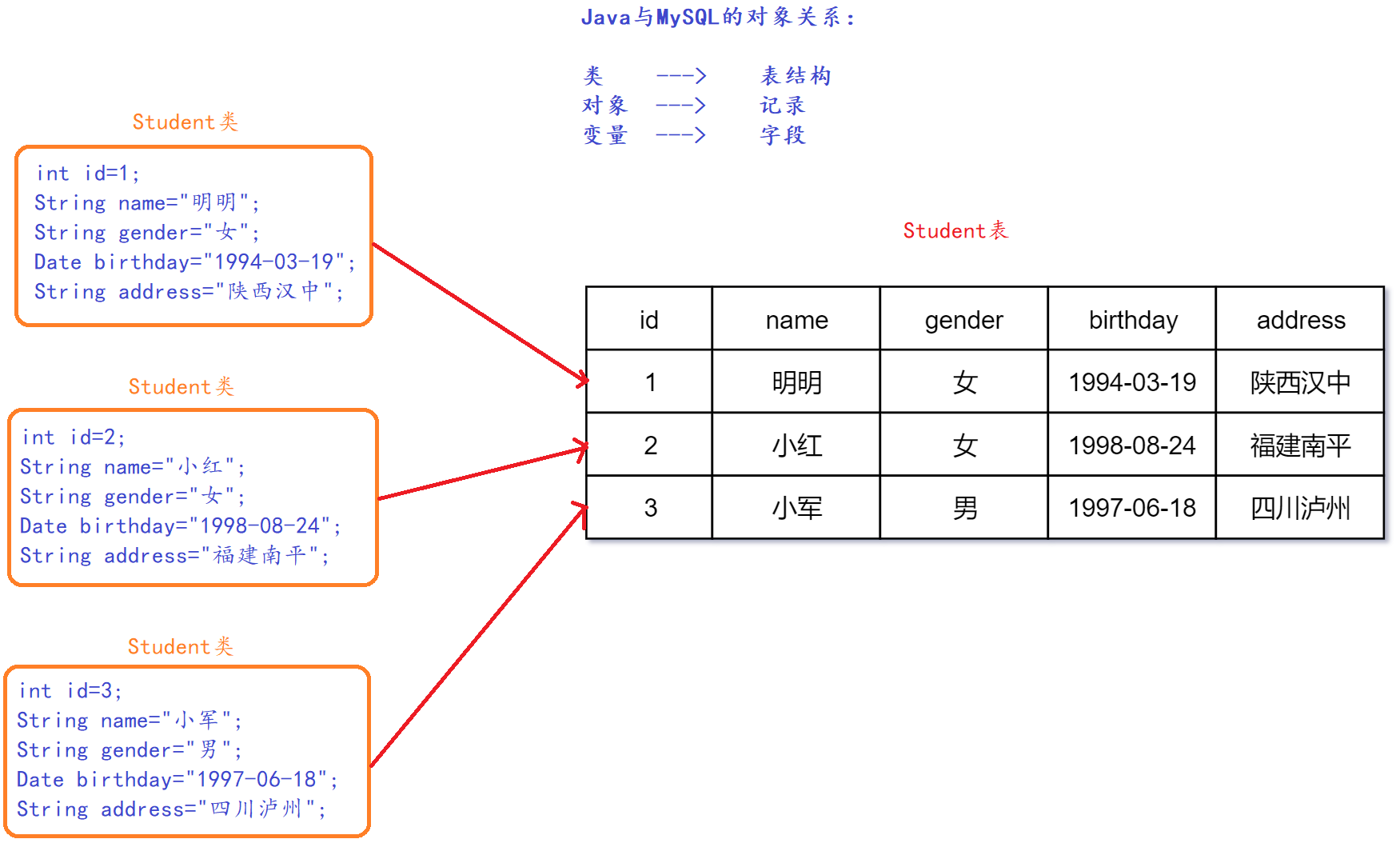
因为如果每次都从结果集中取数据,使用起来不方便。而且用完以后必须要关闭连接。如果用户使用的直接是实体类如:Student对象,或集合List对象,用起来会更方便。不用关闭连接,降低了代码的耦合度。
5.2.4.1 表与类之间的关系
案例:使用PreparedStatement查询id为1的一条学生数据,封装成一个学生Student对象
创建一个学生对象
SQL设置占位符
传递参数,替换占位符
将结果封装成一个学生对象
释放资源
使用数据,输出到控制台
学生对象:
1 2 3 4 5 6 7 8 9 10 11 12 13 14 15 16 17 18 19 20 21 22 23 24 25 26 27 28 29 30 31 32 33 34 35 36 37 38 39 40 41 42 43 44 45 46 47 48 49 50 51 52 53 54 55 56 57 58 59 60 61 62 63 64 65 66 67 68 69 70 71 72 73 74 75 76 77 78 package com.dfbz.entity; import java.util.Date; public class Student { private Integer id; private String name; private String gender; private Date birthday; private String address; @Override public String toString() { return "Student{" + "id=" + id + ", name='" + name + '\'' + ", gender=' " + gender + '\'' + ", birthday= " + birthday + ", address= '" + address + ' \'' + '}' ; } public Student() { } public Student(Integer id, String name, String gender, Date birthday, String address) { this.id = id; this.name = name; this.gender = gender; this.birthday = birthday; this.address = address; } public Integer getId() { return id; } public void setId(Integer id) { this.id = id; } public String getName() { return name; } public void setName(String name) { this.name = name; } public String getGender() { return gender; } public void setGender(String gender) { this.gender = gender; } public Date getBirthday() { return birthday; } public void setBirthday(Date birthday) { this.birthday = birthday; } public String getAddress() { return address; } public void setAddress(String address) { this.address = address; } }
1 2 3 4 5 6 7 8 9 10 11 12 13 14 15 16 17 18 19 20 21 22 23 24 25 @Test public void query () throws SQLException { Connection conn = JdbcUtils.getConnection(); PreparedStatement ps = conn.prepareStatement("select * from student where id=?" ); ps.setInt(1 ,1 ); ResultSet rs = ps.executeQuery(); Student student = new Student (); if (rs.next()) { student.setId(rs.getInt("id" )); student.setName(rs.getString("name" )); student.setGender(rs.getString("gender" )); student.setBirthday(rs.getDate("birthday" )); student.setAddress(rs.getString("address" )); } JdbcUtils.close(conn, ps, rs); System.out.println(student); }
创建一个集合用于封装所有的记录
得到连接对象
得到语句对象,SQL语句没有占位符
每次循环封装一个学生对象
把数据放到集合中
关闭连接
使用数据,循环输出学生对象
1 2 3 4 5 6 7 8 9 10 11 12 13 14 15 16 17 18 19 20 21 22 23 24 25 26 27 28 29 @Test public void findAll () throws SQLException { List<Student> students = new ArrayList <>(); Connection conn = JdbcUtils.getConnection(); PreparedStatement ps = conn.prepareStatement("select * from student" ); ResultSet rs = ps.executeQuery(); while (rs.next()) { Student student = new Student (); student.setId(rs.getInt("id" )); student.setName(rs.getString("name" )); student.setGender(rs.getString("gender" )); student.setBirthday(rs.getDate("birthday" )); student.setAddress(rs.getString("address" )); students.add(student); } JdbcUtils.close(conn, ps, rs); for (Student student : students) { System.out.println(student); } }
5.2.4.2 PreparedStatement小结:
功能
实现
得到PreparesStatement对象的方法
通过连接对象创建
设置占位符的方法
setXxx(占位符位置, 真实值)
执行DML的方法
executeUpdate()
执行DQL的方法
executeQuery()
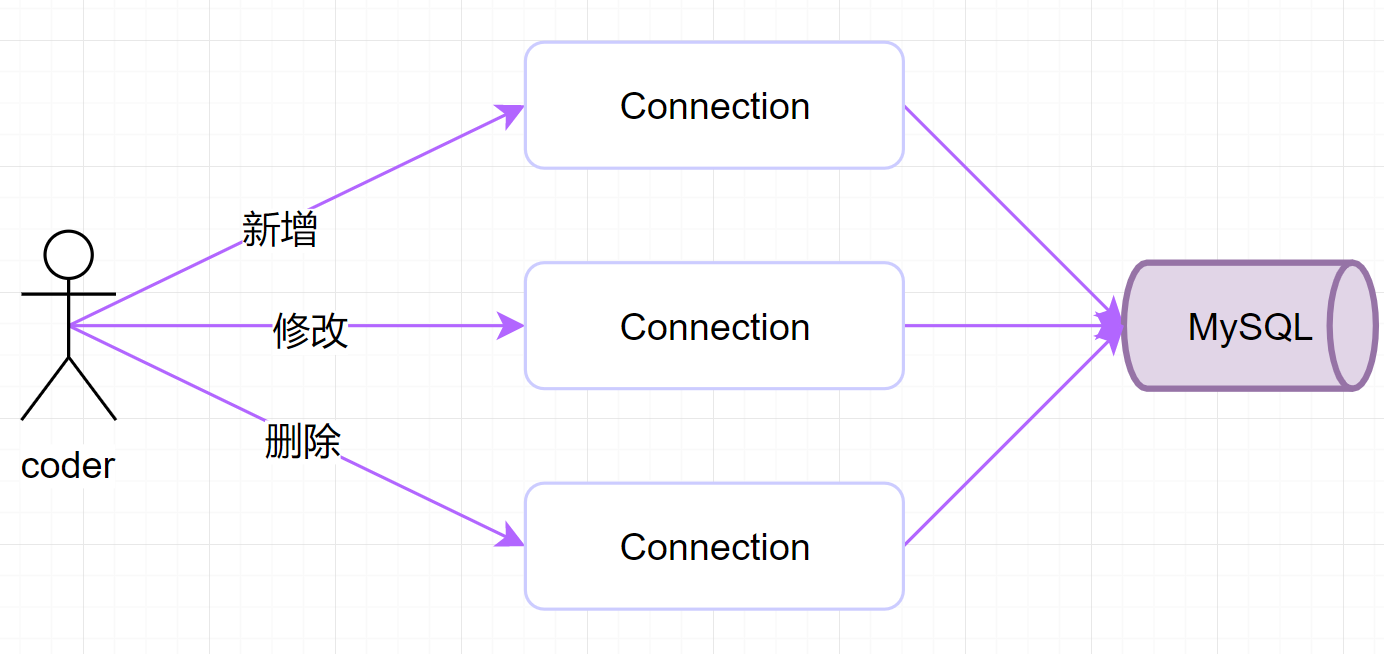
六、连接池的概述 6.1 什么是连接池 6.1.1 JDBC访问数据库时操作Connection对象: 每次访问数据库都必须先创建连接,执行完毕以后关闭连接对象。连接对象需要不停的创建,不停的关闭。
6.1.2 连接对象的使用问题:
数据库创建连接通常需要消耗相对较多的资源,创建时间也较长,而每次操作都要重新获取新的连接对象,执行一次操作就把连接关闭,这样数据库连接对象的使用率低。
假设网站一天10万访问量,数据库服务器就需要创建10万次连接,极大的浪费数据库的资源,并且极易造成数据库服务器内存溢出
6.1.3 连接池需要解决两个问题
提高创建连接对象的速度
提高连接对象的使用率,每个连接对象应该重复使用
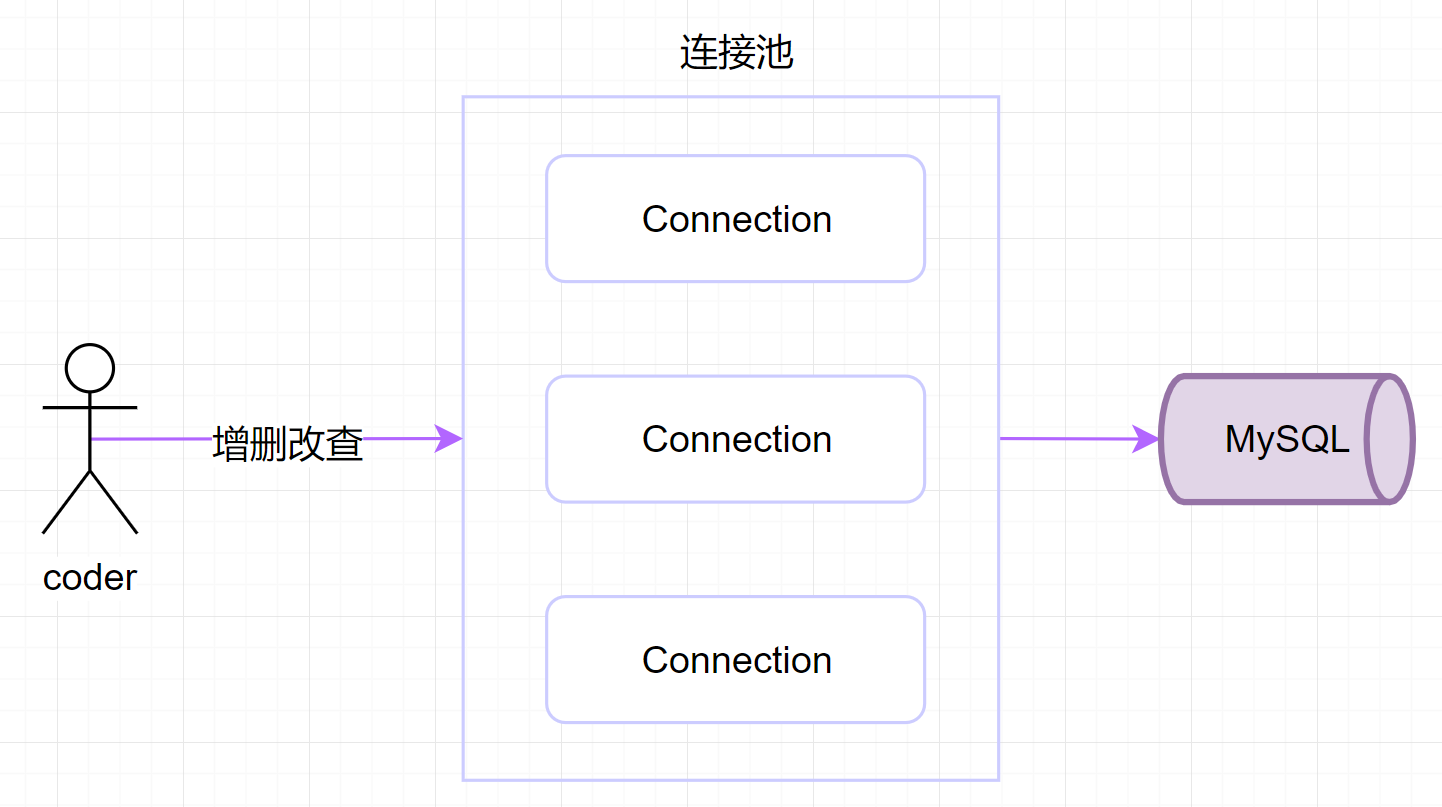
6.1.4 连接池的原理图
6.1.5 连接池解决现状问题的原理
连接对象
操作特点
创建时
程序启动的时候,由应用程序在内存中创建好一定数量的连接对象,放在内存中,这个内存区域就称为连接池,也叫数据源DataSource。
使用时
访问数据库的时候,直接从连接池中得到一个连接对象就可以了
关闭时
不是真的关闭连接,而是将连接对象再放回到连接池中。给下一个用户使用
6.2 数据库连接池API 6.2.1 数据源接口: javax.sql.DataSource:连接池接口,没有具体实现,由第三方厂商来实现,我们要学会使用连接池。
6.2.2 数据源接口中的方法:
DataSource接口中的方法
描述
Connection getConnection()
从连接池中得到一个连接对象
注:DataSource接口本身只有两个方法,但从父接口继承了一些方法
6.2.3 常用连接池参数
常用参数
描述
初始连接数
连接池创建的时候,一开始在连接池中有多少个连接对象
最大连接数
连接池中最多可以创建多少个连接对象
最长等待时间
如果连接池中所有的连接对象都在使用,新来的用户等待多久以后抛出异常。单位毫秒
最长空闲回收时间
如果某个连接对象长时间没有用户使用,多久以后进行回收。不是所有的连接池都支持。
6.3 自定义连接池 6.3.1 自定义连接池步骤
编写一个接口:DataSource,包含getConnection()抽象方法
编写实现类实现javax.sql.DataSource接口,实现接口中的方法
定义与连接池相关的参数,如:初始连接池,最大连接数
创建集合用于保存创建好的连接对象,即连接池。
提供获取连接的公共方法
提供关闭连接的公共方法
6.3.2 创建数据源MyDataSource类:
接口:DataSource,包含getConnection()方法,抛出SQLException
类:MyDataSourceDataSource接口
成员对象:private static LinkedList<Connection> pool
成员变量:initPoolSize初始连接数5,currSize当前连接数0,maxPoolSize最大连接数10
私有成员方法: Connection
构造方法:在构造方法中调用方法创建5个连接对象放在集合中,添加到集合末尾。
公有方法:Connection getConnection()方法,三种情况选其中一种。
如果当前连接池中有连接对象(即size大于0),则直接从集合中removeFirst()得到一个连接
如果当前连接池没有连接对象(即size小于0),并且连接数小于最大连接数,调用createConnection()创建连接返回。
如果当前连接数已经等于最大连接数,则抛出SQLException异常。
公有方法:releaseConnection(Connection conn),把连接对象addLast()放回池中。
1 2 3 4 5 6 7 8 9 10 11 12 13 14 15 16 17 18 19 20 21 22 23 24 25 26 27 28 29 30 31 32 33 34 35 36 37 38 39 40 41 42 43 44 45 46 47 48 49 50 51 52 53 54 55 56 57 58 59 60 61 62 63 64 65 66 67 68 69 70 71 72 73 74 75 76 77 78 79 80 81 82 83 84 85 86 87 88 89 90 91 92 93 94 95 96 97 98 99 100 101 102 103 104 105 106 107 108 109 110 111 112 113 114 115 116 117 118 package com.dfbz.pool;import javax.sql.DataSource;import java.io.PrintWriter;import java.sql.Connection;import java.sql.DriverManager;import java.sql.SQLException;import java.sql.SQLFeatureNotSupportedException;import java.util.LinkedList;import java.util.logging.Logger;public class MyDataSource implements DataSource { private int initPoolSize = 5 ; private int maxPoolSize = 10 ; private int currSize = 0 ; private LinkedList<Connection> pool = new LinkedList <>(); public MyDataSource () { for (int i = 0 ; i < initPoolSize; i++) { pool.addLast(createConnection()); } } private Connection createConnection () { try { currSize++; return DriverManager.getConnection("jdbc:mysql:///db04" ,"root" ,"admin" ); } catch (SQLException e) { e.printStackTrace(); throw new RuntimeException (e); } } @Override public Connection getConnection () throws SQLException { if (pool.size() > 0 ) { return pool.removeFirst(); } else if (pool.size() == 0 && currSize < maxPoolSize) { return createConnection(); } else { throw new SQLException ("已经到达最大连接数:" + maxPoolSize); } } public void releaseConnection (Connection conn) { pool.addLast(conn); } @Override public Connection getConnection (String username, String password) throws SQLException { return null ; } @Override public <T> T unwrap (Class<T> iface) throws SQLException { return null ; } @Override public boolean isWrapperFor (Class<?> iface) throws SQLException { return false ; } @Override public PrintWriter getLogWriter () throws SQLException { return null ; } @Override public void setLogWriter (PrintWriter out) throws SQLException { } @Override public void setLoginTimeout (int seconds) throws SQLException { } @Override public int getLoginTimeout () throws SQLException { return 0 ; } @Override public Logger getParentLogger () throws SQLFeatureNotSupportedException { return null ; } }
6.3.3 测试类使用数据源类:
创建MyDataSource对象
在类中测试看能否得到1连接对象。
先从连接池中拿10个输出,再拿11个输出,等待2秒出现异常。
当i==5时,释放其中一个对象,则可以得到11个连接对象,其中有一个连接是重用的。
1 2 3 4 5 6 7 8 9 10 11 12 13 14 15 16 17 18 19 20 21 22 23 24 25 26 27 28 29 30 package com.dfbz.demo;import com.dfbz.pool.MyDataSource;import java.sql.Connection;public class Demo08_MyDataSource { public static void main (String[] args) throws Exception{ MyDataSource ds = new MyDataSource (); for (int i = 0 ; i < 11 ; i++) { Connection conn = ds.getConnection(); System.out.println("得到第" + (i+1 ) + "个连接" + conn); if (i==5 ) { ds.releaseConnection(conn); } } } }
七、DRUID连接池 7.1 DRUID简介 Druid是阿里巴巴开发的号称为监控而生的数据库连接池,在功能、性能、扩展性方面,都超过其他数据库连接池。Druid已经在阿里巴巴部署了超过600个应用,经过多年生产环境大规模部署的严苛考验。如:一年一度的双十一活动,每年春运的抢火车票。
Druid的下载地址:https://github.com/alibaba/druid
DRUID连接池使用的jar包:druid-1.1.8.jar
7.2 DRUID常用的配置参数
参数
说明
url
连接字符串
username
用户名
password
密码
driverClassName
驱动库com.mysql.jdbc.Driver
initialSize
初始连接数
maxActive
最大连接数
maxWait
最长等待时间
7.3 DRUID连接池基本使用 7.3.1 API介绍
DruidDataSourceFactory的方法
方法
public static DataSource createDataSource(Properties properties)
通过属性对象得到数据源对象
7.3.2 开发步骤
在src目录下创建一个properties文件,文件名随意,设置上面的参数
加载properties文件的内容到Properties对象中
创建DRUID连接池,使用配置文件中的参数
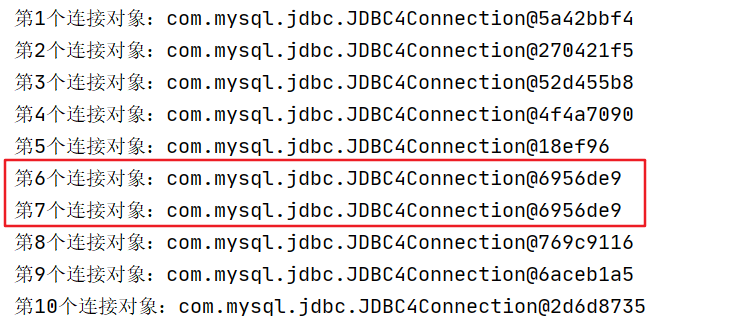
从DRUID连接池中取出10个连接输出
再从连接池中取出11个连接,并且释放其中的一个。
7.3.3 案例演示
属性文件:在src目录下新建一个DRUID配置文件,命名为:druid.properties
参数:初始连接数3个,最大连接池10,最长等待时间2秒
1 2 3 4 5 6 7 8 9 10 11 12 url =jdbc:mysql://localhost:3306/db04 username =root password =root driverClassName =com.mysql.jdbc.Driver initialSize =5 maxActive =10 maxWait =2000
1 2 3 4 5 6 7 8 9 10 11 12 13 14 15 16 17 18 19 20 21 22 23 24 25 26 27 28 29 30 31 32 33 34 35 36 37 38 package com.dfbz.demo;import com.alibaba.druid.pool.DruidDataSourceFactory;import javax.sql.DataSource;import java.io.InputStream;import java.sql.Connection;import java.util.Properties;public class Demo09_Druid { public static void main (String[] args) throws Exception { Properties info = new Properties (); InputStream in = Demo09_Druid.class.getResourceAsStream("/druid.properties" ); info.load(in); DataSource ds = DruidDataSourceFactory.createDataSource(info); for (int i = 1 ; i <=10 ; i++) { Connection conn = ds.getConnection(); System.out.println("第" + i + "个连接对象:" + conn); if (i==5 ) { conn.close(); } } } }
正常得到10个连接
八、连接池工具类 8.1 创建工具类DataSourceUtils.java
创建私有静态数据源成员变量DataSource ds
在静态代码块中创建连接池
创建属性对象
从类路径下加载属性文件,得到输入流对象
通过工厂类创建一个数据源
创建公有的得到数据源的方法getDataSource()
创建得到连接对象的方法 getConnection()
创建释放资源的方法 close()
1 2 3 4 5 6 7 8 9 10 11 12 13 14 15 16 17 18 19 20 21 22 23 24 25 26 27 28 29 30 31 32 33 34 35 36 37 38 39 40 41 42 43 44 45 46 47 48 49 50 51 52 53 54 55 56 57 58 59 60 61 62 63 64 65 66 67 68 69 70 71 72 73 74 75 76 77 78 79 80 81 82 83 84 85 86 87 88 89 90 91 92 93 94 95 package com.dfbz.utils;import com.alibaba.druid.pool.DruidDataSourceFactory;import javax.sql.DataSource;import java.io.InputStream;import java.sql.Connection;import java.sql.ResultSet;import java.sql.SQLException;import java.sql.Statement;import java.util.Properties;public class DataSourceUtils { private static DataSource ds; static { Properties info = new Properties (); try ( InputStream in = DataSourceUtils.class.getResourceAsStream("/druid.properties" );) { info.load(in); ds = DruidDataSourceFactory.createDataSource(info); } catch (Exception e) { e.printStackTrace(); } } public static DataSource getDataSource () { return ds; } public static Connection getConnection () { try { return ds.getConnection(); } catch (SQLException e) { e.printStackTrace(); throw new RuntimeException (e); } } public static void close (Connection conn, Statement stmt, ResultSet rs) { if (rs!=null ) { try { rs.close(); } catch (SQLException e) { e.printStackTrace(); } } if (stmt!=null ) { try { stmt.close(); } catch (SQLException e) { e.printStackTrace(); } } if (conn!=null ) { try { conn.close(); } catch (SQLException e) { e.printStackTrace(); } } } public static void close (Connection conn, Statement stmt) { close(conn, stmt, null ); } }
8.2 数据源工具类的使用
通过数据源的工具类得到一个连接对象
创建PreparedStatement语句,创建表连接的SQL语句。
执行executeQuery(),查询出结果集,封装成List<Student>
通过工具类释放资源
1 2 3 4 5 6 7 8 9 10 11 12 13 14 15 16 17 18 19 20 21 22 23 24 25 26 27 28 29 30 31 32 33 34 35 36 37 38 39 40 41 42 43 44 45 46 47 48 49 50 51 52 53 54 55 56 package com.dfbz.demo;import com.dfbz.entity.Student;import com.dfbz.utils.DataSourceUtils;import org.junit.Test;import java.sql.Connection;import java.sql.PreparedStatement;import java.sql.ResultSet;import java.util.ArrayList;import java.util.Date;import java.util.List;public class Demo10 { @Test public void test1 () throws Exception{ List<Student> stuList = new ArrayList <>(); Connection conn = DataSourceUtils.getConnection(); PreparedStatement ps = conn.prepareStatement("select * from student;" ); ResultSet rs = ps.executeQuery(); while (rs.next()) { int id = rs.getInt("id" ); String name = rs.getString("name" ); String gender = rs.getString("gender" ); Date birthday = rs.getDate("birthday" ); String address = rs.getString("address" ); Student student=new Student (id,name,gender,birthday,address); stuList.add(student); } DataSourceUtils.close(conn, ps, rs); for (Student student : stuList) { System.out.println(student); } } }